
Manufacturing leaders often focus on equipment, automation, and production schedules when looking for ways to improve efficiency. While these factors are important, one area is frequently overlooked: workspace design.
An inefficient workstation can slow production, increase employee fatigue, create safety hazards, and make it more difficult to maintain consistent quality. Over time, these small inefficiencies add up, affecting productivity, employee satisfaction, and operational costs.
By understanding how workspace design influences daily operations, manufacturers can identify opportunities to improve efficiency without necessarily investing in new machinery or expanding their facilities.
Why Workspace Design Matters
Every workstation serves as the foundation for a specific task. Whether employees are assembling components, inspecting products, packaging shipments, or conducting laboratory testing, the workspace should support the work being performed.
When a workstation is designed around the needs of employees and production processes, it becomes easier to:
- Complete tasks efficiently.
- Minimize unnecessary movement.
- Maintain organized tools and materials.
- Reduce errors and rework.
- Adapt to changing production requirements.
On the other hand, poorly designed workspaces create obstacles that employees must work around every day.
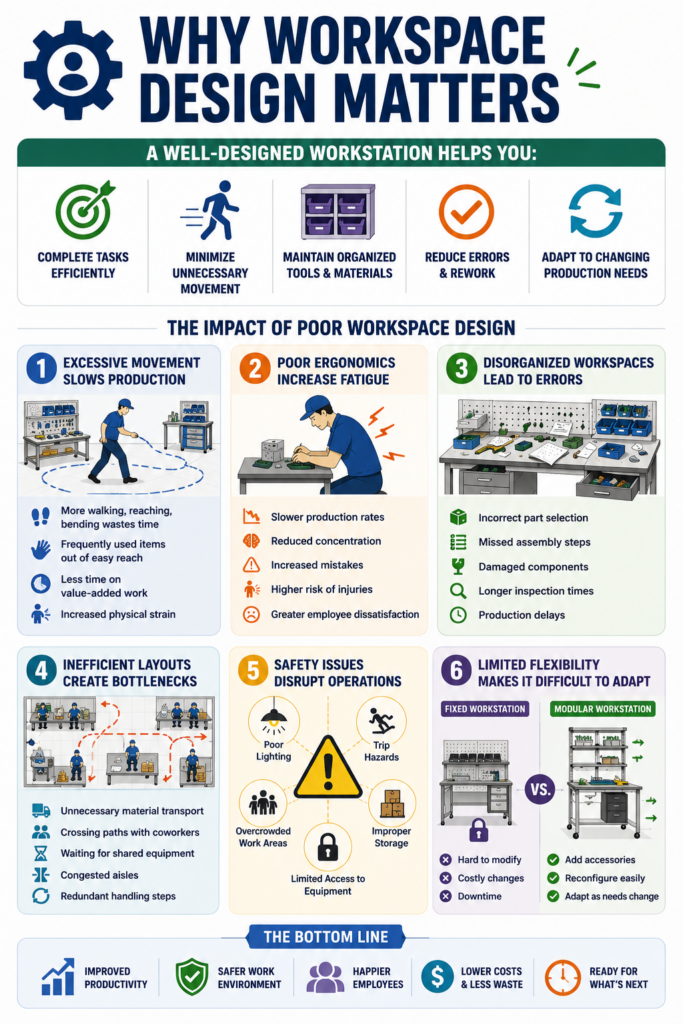
1. Excessive Movement Slows Production
One of the most common signs of poor workspace design is unnecessary movement. Employees who constantly reach, bend, twist, or walk to retrieve tools and materials spend less time performing value-added work.
For example, if frequently used tools are stored several feet away from the assembly area, employees may repeat the same unnecessary motion hundreds of times throughout a shift. While each trip may only take a few seconds, the cumulative effect can significantly reduce productivity.
Well-designed workstations position commonly used items within easy reach, helping operators complete tasks more efficiently while reducing physical strain.
2. Poor Ergonomics Increase Fatigue
Manufacturing jobs often involve repetitive tasks. When workstations force employees into awkward postures or repetitive reaching, fatigue develops more quickly.
Fatigue can lead to:
- Slower production rates.
- Reduced concentration.
- Increased mistakes.
- Higher risk of musculoskeletal injuries.
- Greater employee dissatisfaction.
Features such as adjustable work surfaces, ergonomic seating, proper lighting, and thoughtfully placed accessories help create a more comfortable environment that supports productivity throughout the workday.
3. Disorganized Workspaces Lead to Errors
Searching for tools, parts, or documents interrupts workflow and increases the likelihood of mistakes.
A cluttered workstation can contribute to:
- Incorrect part selection.
- Missed assembly steps.
- Damaged components.
- Longer inspection times.
- Production delays.
Storage solutions, shelving, drawers, bins, and shadow boards help ensure that every item has a designated location. This organization allows employees to focus on their tasks instead of searching for the resources they need.
4. Inefficient Layouts Create Bottlenecks
Even if individual workstations function well, the overall layout of a production area can affect workflow.
Poor layouts may require employees to:
- Transport materials unnecessarily.
- Cross paths with coworkers.
- Wait for shared equipment.
- Navigate congested aisles.
- Perform redundant handling steps.
Optimizing workstation placement and material flow helps reduce these bottlenecks, creating smoother production processes and improving throughput.
5. Safety Issues Disrupt Operations
Unsafe work environments affect more than employee well-being. Workplace injuries can lead to downtime, increased costs, and production interruptions.
Common workspace-related safety concerns include:
- Poor lighting.
- Trip hazards.
- Overcrowded work areas.
- Improper storage.
- Limited access to frequently used equipment.
Designing workstations with safety in mind helps reduce risks while supporting consistent production.
6. Limited Flexibility Makes It Difficult to Adapt
Manufacturing environments continue to evolve. New product lines, changing customer requirements, and process improvements often require adjustments to existing workspaces.
Fixed workstations may be difficult to modify without significant expense or downtime.
Modular workstations provide greater flexibility by allowing manufacturers to add accessories, reconfigure layouts, or relocate workstations as production needs change. This adaptability can help facilities respond more quickly to changing demands while protecting their long-term investment.
The Business Cost of Poor Workspace Design
The impact of poor workspace design extends beyond individual workstations. Small inefficiencies can accumulate over weeks and months, resulting in measurable business costs.
For example, production delays caused by inefficient layouts can reduce throughput, while repetitive strain injuries may increase absenteeism and workers’ compensation claims. Frequent errors or rework can also lead to wasted materials, missed deadlines, and reduced customer satisfaction.
Investing in workspace improvements is often about more than employee comfort. It is a strategic decision that can help manufacturers improve operational efficiency, reduce unnecessary costs, and create a more adaptable production environment.
Signs Your Workspace May Be Affecting Productivity
If any of the following sound familiar, it may be time to evaluate your workspace design:
- Employees frequently leave their stations to retrieve tools or materials.
- Operators report discomfort during repetitive tasks.
- Work areas become cluttered throughout the day.
- Production bottlenecks occur in specific locations.
- Product quality varies between shifts.
- Workstations cannot easily adapt to new production requirements.
Once you’ve identified these challenges, the next step is determining whether your existing workstations can be optimized or if a new solution is needed. Understanding the differences between standard and custom workstations can help you evaluate which option best supports your workflow, production requirements, and future growth.
Improving Workspace Design
Improving productivity does not always require a complete facility redesign. Small, targeted improvements can have a meaningful impact.
Consider evaluating:
- Workstation height and ergonomics.
- Tool and material placement.
- Storage and organization.
- Lighting quality.
- Accessibility of power and utilities.
- Material flow between workstations.
- Flexibility for future process changes.
Taking a systematic approach helps ensure that workspace improvements support both employee performance and long-term operational goals.
The Value of Purpose-Built Workstations
Every manufacturing operation has unique requirements. A workstation designed for electronics assembly will differ from one used in aerospace manufacturing, laboratory testing, or medical device production.
Purpose-built workstations allow manufacturers to configure features such as storage, lighting, power integration, shelving, mobility, and ergonomic adjustments to support their specific workflows. The result is a workspace that aligns with daily operations instead of forcing employees to adapt to unnecessary limitations.
If you’re looking for a workstation that fits your workspace, workflow, and long-term operational goals, a customized solution may be the right choice. At Bench-Tek Manufacturing, we design modular workstations and laboratory furniture tailored to each customer’s unique requirements, making it easier to create efficient, adaptable workspaces without compromising on functionality.
Key Takeaways
- Poor manufacturing workspace design can reduce productivity by increasing unnecessary movement, fatigue, and workflow interruptions.
- Ergonomic, organized workstations help employees work more comfortably, efficiently, and safely.
- Optimizing workstation layouts can reduce bottlenecks, improve material flow, and support higher throughput.
- Flexible, modular workstations make it easier to adapt to new products, processes, and facility changes.
- Even small improvements to workspace design can lead to measurable gains in efficiency, quality, and employee satisfaction.
- Regularly evaluating workstation performance helps manufacturers identify opportunities to reduce waste and improve operational outcomes.