Improving workplace efficiency doesn’t always require major equipment upgrades or a complete workspace redesign. Sometimes, small adjustments to an existing workstation can make everyday tasks easier, improve how space is used, and help employees work more effectively.
In manufacturing facilities, laboratories, and other technical environments, workstations serve as the foundation for a wide range of activities. However, the worksurface alone doesn’t determine how efficiently a task can be completed. The placement of tools, the accessibility of equipment, and the overall workstation configuration all influence how smoothly daily operations run.
This is where workstation accessories can make a difference. From dedicated storage solutions to adjustable equipment supports, the right additions can address specific workplace challenges and help create a setup that better aligns with the work being performed.
Keep Essential Tools and Materials Within Reach
When employees frequently need to leave their workstations to retrieve supplies or search for tools, these interruptions can disrupt their workflow. Even brief delays can become significant when the same activities are repeated throughout the day.
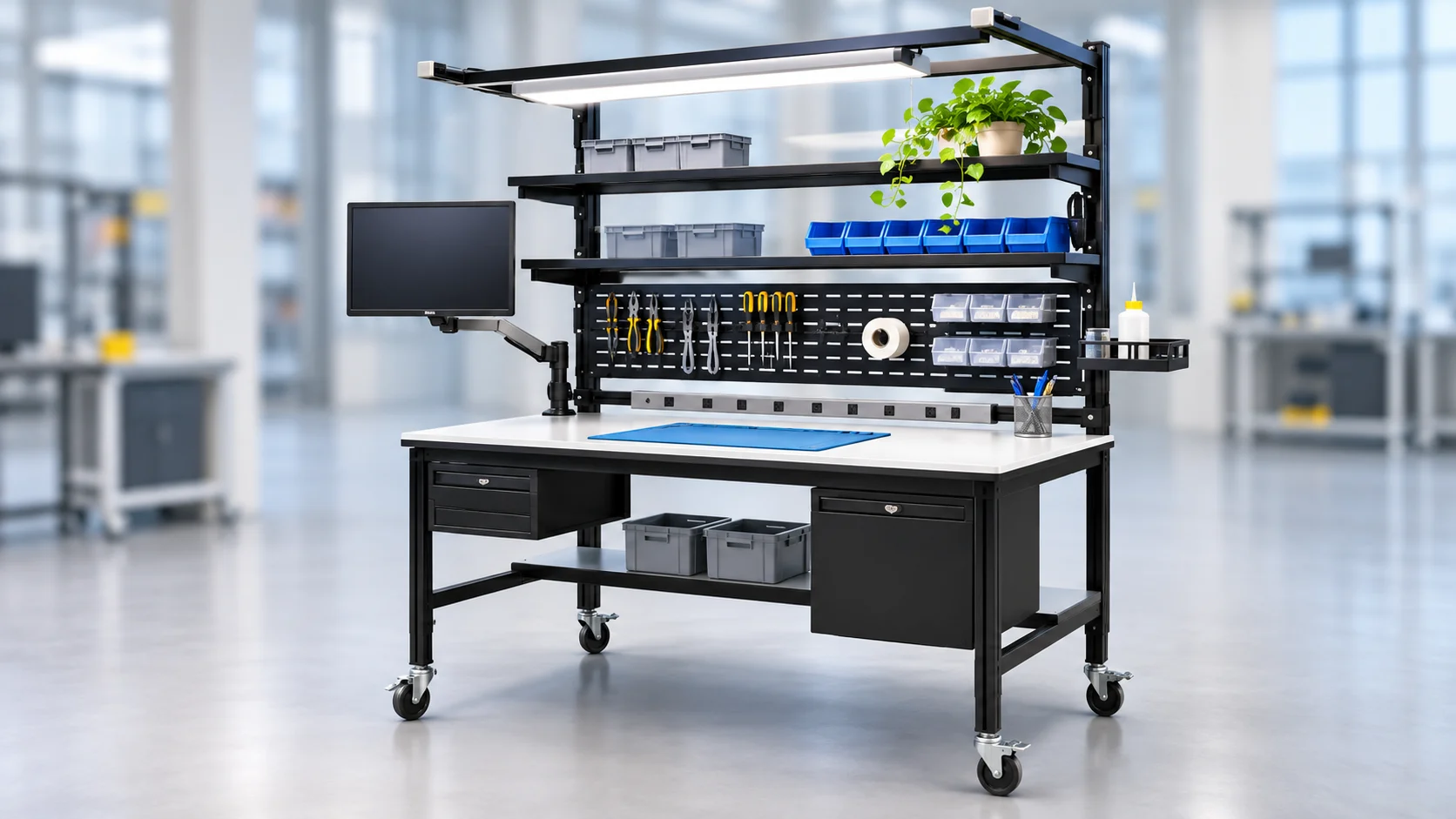
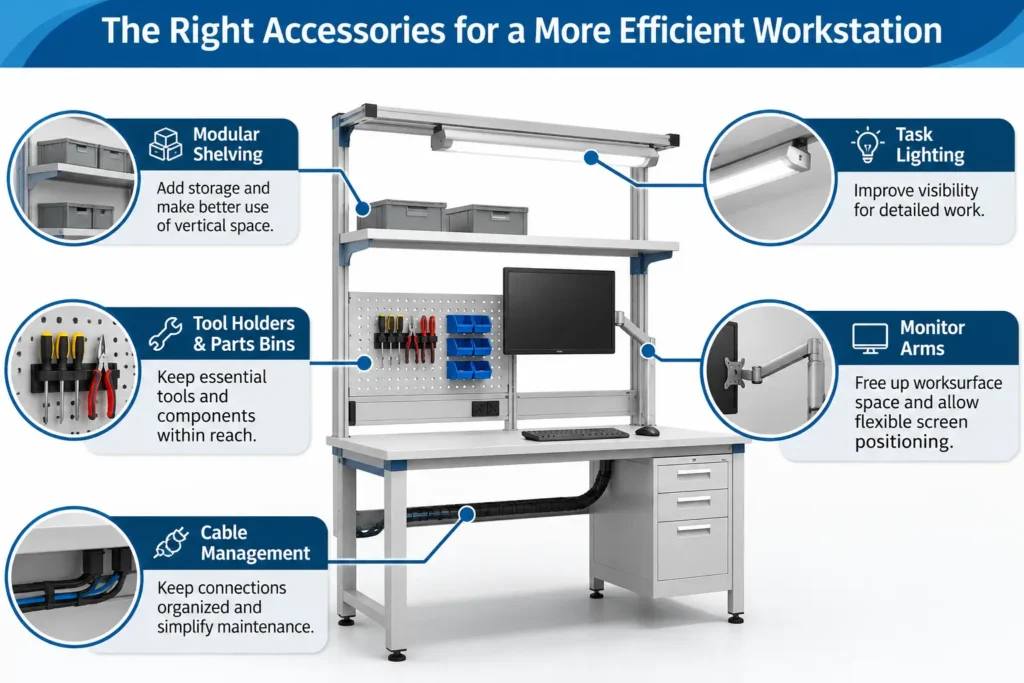
Tool holders, parts bins, and other storage accessories help address this challenge by placing frequently used items closer to the point of use. Instead of moving between different storage locations, employees can access the materials they need while remaining focused on their tasks.
For example, an electronics assembly operator may benefit from component bins positioned near the active work area, allowing parts to be retrieved in the order they’re needed. Similarly, dedicated tool holders can make it easier for technicians to access and return equipment during repetitive procedures.
By arranging essential items around the sequence of work, businesses can reduce unnecessary movement and support a more consistent workflow.
Make Better Use of Available Worksurface Space
In facilities where floor space is limited, expanding a workstation isn’t always practical. Instead, businesses can improve functionality by making better use of the space already available.
Accessories such as monitor arms and overhead shelving allow equipment and materials to be positioned above or away from the primary worksurface. This creates additional room for tasks that require an unobstructed working area, such as assembly, inspection, or equipment testing.
For instance, mounting a monitor on an adjustable arm eliminates the need for a traditional monitor stand, freeing up space for instruments, components, or documentation. Overhead shelving can also accommodate equipment and supplies that would otherwise occupy valuable worksurface space.
These additions are particularly useful in compact work environments where multiple activities must be supported within a limited footprint. By taking advantage of vertical space and alternative mounting positions, businesses can increase workstation functionality without requiring additional floor space.
Support Comfort and Ergonomics Throughout the Workday
While accessibility and space utilization are important, workstation efficiency also depends on how comfortably employees can perform their tasks.
Work that involves prolonged sitting, standing, or repetitive movements can become more demanding when equipment is positioned at inconvenient heights or angles. Accessories that allow users to adjust their working environment can help accommodate different tasks and individual preferences.
Adjustable monitor mounts, for example, allow screens to be positioned at suitable viewing heights and angles. Keyboard trays can provide additional flexibility for seated computer work, while adjustable task lighting helps direct illumination toward areas where detailed work is performed.
In inspection and precision assembly applications, properly positioned lighting can be especially valuable when employees need to examine small components or identify fine details.
Rather than expecting employees to adapt to a fixed workstation arrangement, adjustable accessories allow the workspace to be configured around the requirements of the task. This can contribute to a more comfortable working experience and support sustained attention during detailed activities.
Improve Cable Management and Equipment Organization
As workstations accommodate more electronic devices, managing cables and connections becomes increasingly important. Computers, monitors, test instruments, and other powered equipment can introduce multiple cables that need to be routed safely and efficiently.
Without proper management, loose cables can interfere with equipment placement, complicate maintenance, and make work areas more difficult to clean.
Cable trays, routing channels, and other cable management accessories help keep connections organized and separated from active work areas. They can also make it easier to identify individual cables when equipment needs to be inspected, serviced, or replaced.
This is especially relevant in technical workspaces where several instruments may be connected to power supplies, computers, or data systems.
A well-planned cable management arrangement does more than improve the appearance of a workstation. It helps maintain access to equipment connections and supports a more manageable setup as additional devices are introduced.
Build Flexibility Into Your Workstation
Operational requirements can change as businesses introduce new products, update processes, or adopt different equipment. A workstation configured for one application may eventually need to support another.
Modular accessories help businesses respond to these changes by allowing workstation configurations to be modified as needs evolve.
For example, an inspection workstation may initially require a monitor mount and task lighting. If the process later incorporates additional testing equipment, the workstation may need new equipment supports or mounting options to accommodate the expanded setup.
With a compatible modular workstation system, these adjustments may be possible without replacing the entire unit.
This approach can be particularly useful in facilities that regularly update production processes or need to accommodate different applications within the same workspace. By planning for adaptability, businesses can make workstation investments that remain useful as operational requirements change.
Choose Accessories Based on Your Workflow
Although workstation accessories offer a range of benefits, not every addition will be useful in every application. The most effective configurations are those designed around the actual requirements of the work being performed.
An electronics assembly station may prioritize component accessibility and precision lighting, while a laboratory workstation may require equipment supports and surfaces that accommodate specific instruments and procedures. The appropriate accessories depend on the tasks, available space, and operating conditions.
Before selecting accessories, businesses should evaluate their existing workstation setup and identify where improvements are needed. A few useful questions include:
- Which activities take the most time during a typical work cycle?
- Are tools, materials, and equipment positioned according to the sequence of tasks?
- Is the available worksurface sufficient for the work being performed?
- Do operators need greater flexibility in equipment positioning?
- Are there specific environmental or operational requirements that accessories must meet?
- Could future equipment or process changes affect the workstation configuration?
These questions help ensure that accessory selections address real challenges rather than adding unnecessary complexity.
Taking the time to understand these requirements also makes it easier to develop a workstation configuration that balances functionality, operator needs, and long-term adaptability.
Small Changes, Meaningful Improvements
Workstation accessories may be relatively small additions, but their value comes from the specific problems they help solve. A strategically placed tool holder can simplify repetitive tasks, a monitor arm can create more usable worksurface space, and a cable management system can make equipment connections easier to maintain.
The key is to approach workstation improvements with a clear understanding of the work being performed. When each accessory serves a defined purpose, the result is a more functional setup that supports daily operations without unnecessary additions.
At Bench-Tek, we help businesses configure modular workstations to meet their unique operational requirements. From selecting compatible accessories to developing customized workstation arrangements, our team works closely with customers to create practical solutions suited to their equipment, processes, and workspace constraints.
Looking to improve your workstation setup? Contact Bench-Tek to explore accessory options and customized workstation solutions designed around the way you work.
Key Takeaways
- Improve workflow efficiency: Workstation accessories keep essential tools and materials accessible, reducing unnecessary movement and interruptions.
- Maximize available space: Monitor arms, overhead shelving, and other accessories create more usable worksurface space.
- Support operator comfort: Adjustable accessories allow equipment to be positioned for better ergonomics and task-specific needs.
- Simplify equipment management: Cable management solutions help organize connections and make maintenance easier.
- Adapt to changing requirements: Modular accessories allow workstations to accommodate new equipment, processes, and operational needs.
- Customize with purpose: Selecting accessories based on specific workflows helps create more functional and efficient workstations.