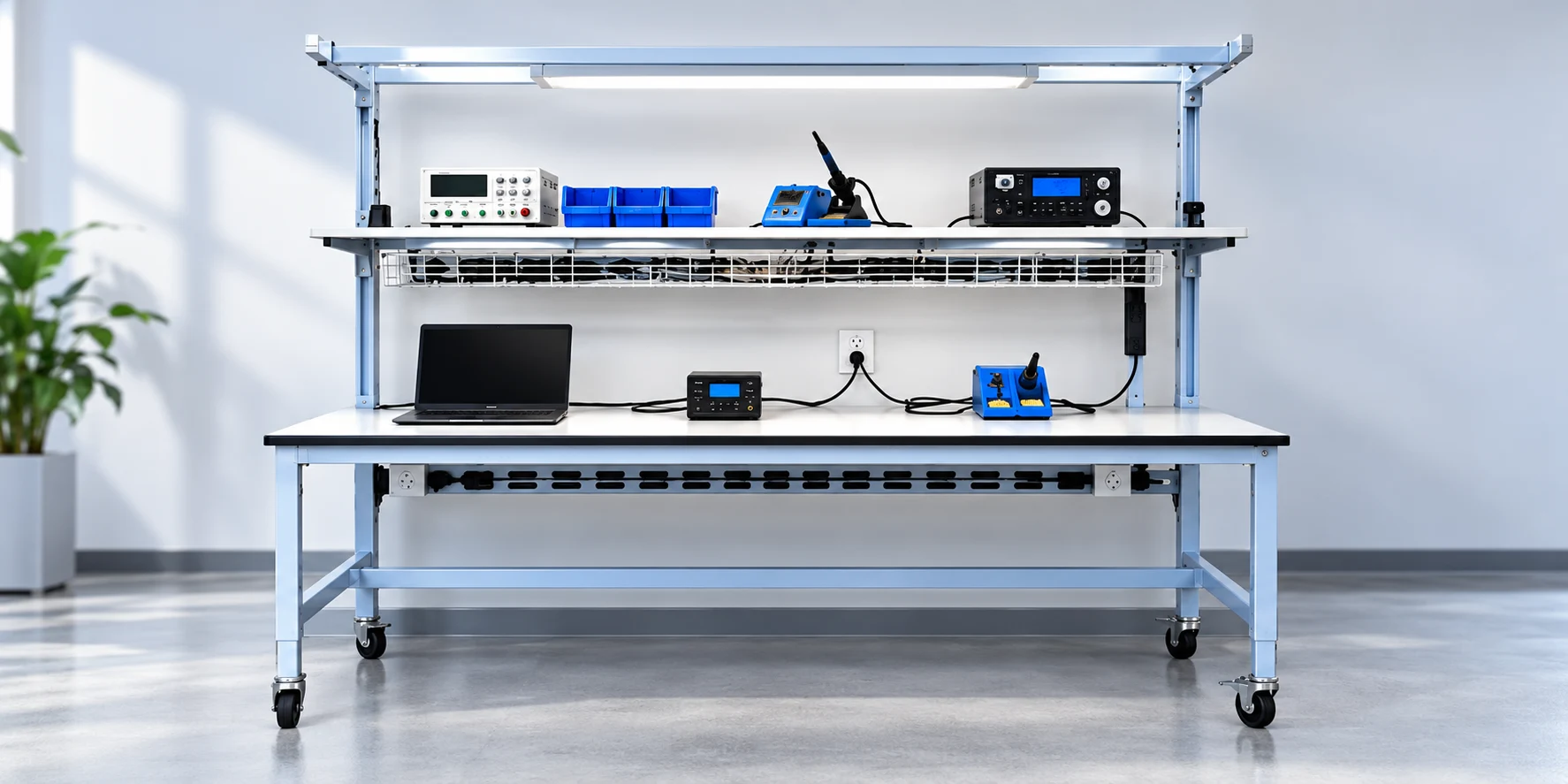
Power cords, data cables, equipment connections, and charging leads are easy to overlook when planning a lab or manufacturing workspace. Yet as more equipment is added, those cables can quickly become part of the day-to-day workflow.
A workstation may need to support computers, monitors, test equipment, task lighting, scanners, power supplies, instrumentation, and other devices. In some environments, those requirements can change frequently as equipment is replaced or processes evolve.
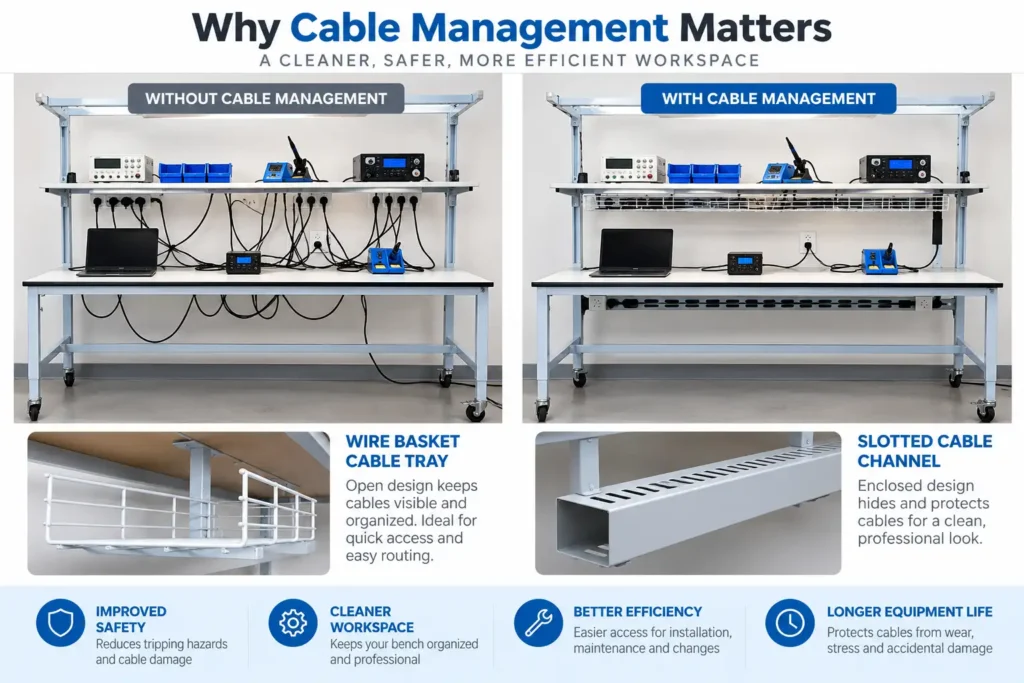
Good cable management is not simply about making a workspace look organized. It can help keep connections accessible, reduce clutter around the work area, simplify equipment changes, and create a workspace that is easier for employees to use and maintain.
Cable Management Starts With Workspace Planning
Cable management is easiest to address before equipment is installed.
During workspace planning, teams should identify what equipment will be used, where operators need to access it, and what power or data connections each device requires. That information can influence where equipment is positioned and how cables should travel through the workspace.
For example, consider questions such as:
- How many powered devices will be used at the station?
- Where will monitors, computers, test equipment, or instruments be positioned?
- Which devices need data connections?
- Will employees regularly connect and disconnect equipment?
- Are there cables that need to remain accessible?
- Could additional equipment be introduced later?
- Does the workspace need to be reconfigured for different tasks?
Thinking about these requirements early can prevent employees from having to work around inconvenient cable routes after the workspace is already in use.
When the workstation itself needs to accommodate equipment, storage, utilities, and other requirements, configurable industrial workbench solutions can make it easier to plan the entire work area as one system rather than treating each component separately.
Reduce Clutter Around the Work Area
Cables tend to accumulate gradually. A new monitor is installed. A piece of test equipment is added. Another device needs a charger. Eventually, several cables may be competing for the same space.
Without a defined routing strategy, cables can end up running across work surfaces, hanging behind equipment, or collecting near the floor.
Keeping cables organized helps preserve usable workspace for the actual task. It can also make it easier for employees to identify which connection belongs to which piece of equipment.
Accessories and storage can play an important role here. Integrating workbench accessories, cabinets, and storage units into the overall configuration can help keep tools, equipment, supplies, and cables from competing for valuable work surface space.
Make Equipment Easier to Access and Maintain
A neatly routed cable is useful only if employees and maintenance teams can still reach it when necessary.
Equipment eventually needs to be moved, inspected, replaced, or serviced. If cables are tangled together or routed through difficult-to-reach areas, even a relatively simple equipment change can become more complicated.
Effective cable management should balance organization with accessibility.
Connections that employees use frequently should remain easy to reach. Permanent or less frequently accessed cables can often be routed away from the primary work area. Labeling may also be useful in environments with many similar connections.
The goal is to create an arrangement that employees can understand without having to trace every cable from one end to the other.
Support a Safer, More Usable Workspace
Loose cables can also affect how employees move around and interact with a workstation.
Cables should not unnecessarily interfere with walking areas, chairs, carts, drawers, doors, or frequently used equipment. Keeping them appropriately routed can reduce obstacles and help maintain a cleaner working area.
The same principle applies to adjustable workstations. A height-adjustable station introduces another consideration because cables need to accommodate movement.
With ergonomic lift stations for height-adjustable work, cable routing should account for the station’s full range of adjustment. Cables need sufficient length and an appropriate routing path so that raising or lowering the work surface does not create unnecessary tension or interference.
This is one reason cable planning and ergonomic planning should happen together rather than independently.
Consider Cleaning and Housekeeping Requirements
Cable organization can also influence how easy a workspace is to clean.
Large bundles of loose cables can create areas where dust and debris collect. Cables on or near the floor may also make routine housekeeping more cumbersome.
This can be particularly relevant in laboratories, electronics production, medical device manufacturing, and other environments where teams place a high priority on orderly work areas.
The exact requirements will vary by facility, but a well-planned cable layout can make it easier to access surfaces and surrounding areas during routine cleaning.
Plan for More Than Electrical Cords
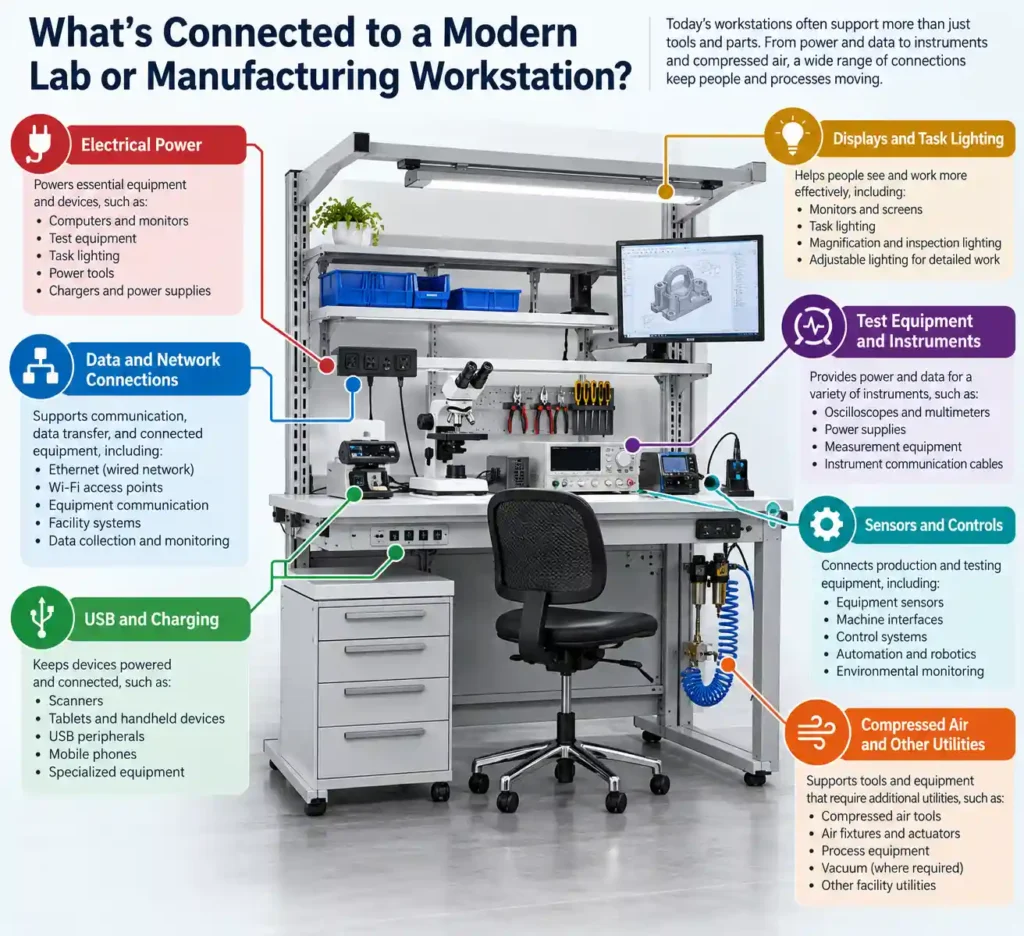
Cable management is often discussed as though it only involves power cords. Modern labs and manufacturing environments can have much broader connectivity requirements.
A workstation might incorporate:
- Electrical power
- Ethernet and other data connections
- USB cables
- Monitor and display connections
- Equipment communication cables
- Charging cables
- Sensor connections
- Test equipment leads
Some facilities may also need to plan nearby routes for compressed air or other utilities. Although those services require different considerations than electrical and data cabling, they should still be evaluated as part of the overall workspace.
Looking at all of these requirements together can help avoid situations where one utility interferes with another or where connections are added as an afterthought.
Think About Future Equipment Changes
Today’s cable requirements may not be tomorrow’s cable requirements.
Manufacturing processes evolve. Laboratories introduce new instruments. Companies add automation, digital work instructions, scanners, monitors, and connected equipment. A workstation designed around one fixed arrangement can become difficult to use when those requirements change.
Planning some flexibility into cable routing can make future modifications easier.
That might mean allowing room for additional connections, choosing routing methods that can be accessed later, or configuring the workstation so components can be repositioned without rebuilding the entire workspace.
This is particularly important in facilities with high-mix production, R&D operations, pilot manufacturing, or processes that are frequently updated.
Cable Management Should Follow the Workflow
There is no single cable management layout that works for every lab or manufacturing facility.
A technician using several pieces of test equipment has different needs from an employee performing repetitive assembly. A research laboratory has different equipment than an electronics production area. Even two stations performing similar tasks may require different configurations because of available space or operator preferences.
That is why the best starting point is the work being performed.
Identify the equipment. Understand how employees interact with it. Determine which connections need frequent access. Consider how the workstation may change. Then develop the cable routing around those requirements.
When standard configurations cannot accommodate those needs, a custom workstation planning and quote process can help translate equipment, utility, storage, ergonomic, and workflow requirements into a workstation designed for the application.
A Small Detail With a Significant Role
Cable management may seem like a minor part of designing a lab or manufacturing workspace, but it touches many aspects of daily operations.
Thoughtful planning can keep work surfaces clearer, make equipment connections easier to identify, improve accessibility for maintenance and changes, support housekeeping, and make future reconfiguration less complicated.
Most importantly, cable management should not be something teams figure out after equipment arrives. Considering power, data, equipment, storage, ergonomics, and cable routing together creates a workspace that is better prepared for both today’s process and whatever comes next.
Key Takeaways
- Good cable management helps keep lab and manufacturing workspaces organized, accessible, and easier to maintain.
- Planning power, data, equipment connections, and other utilities early can prevent clutter and difficult cable routing later.
- Cable routing should support the workflow, equipment placement, ergonomics, and cleaning requirements.
- Flexible cable management makes it easier to add, move, or replace equipment as operational needs change.
- Cable management is most effective when considered as part of the overall workspace design.