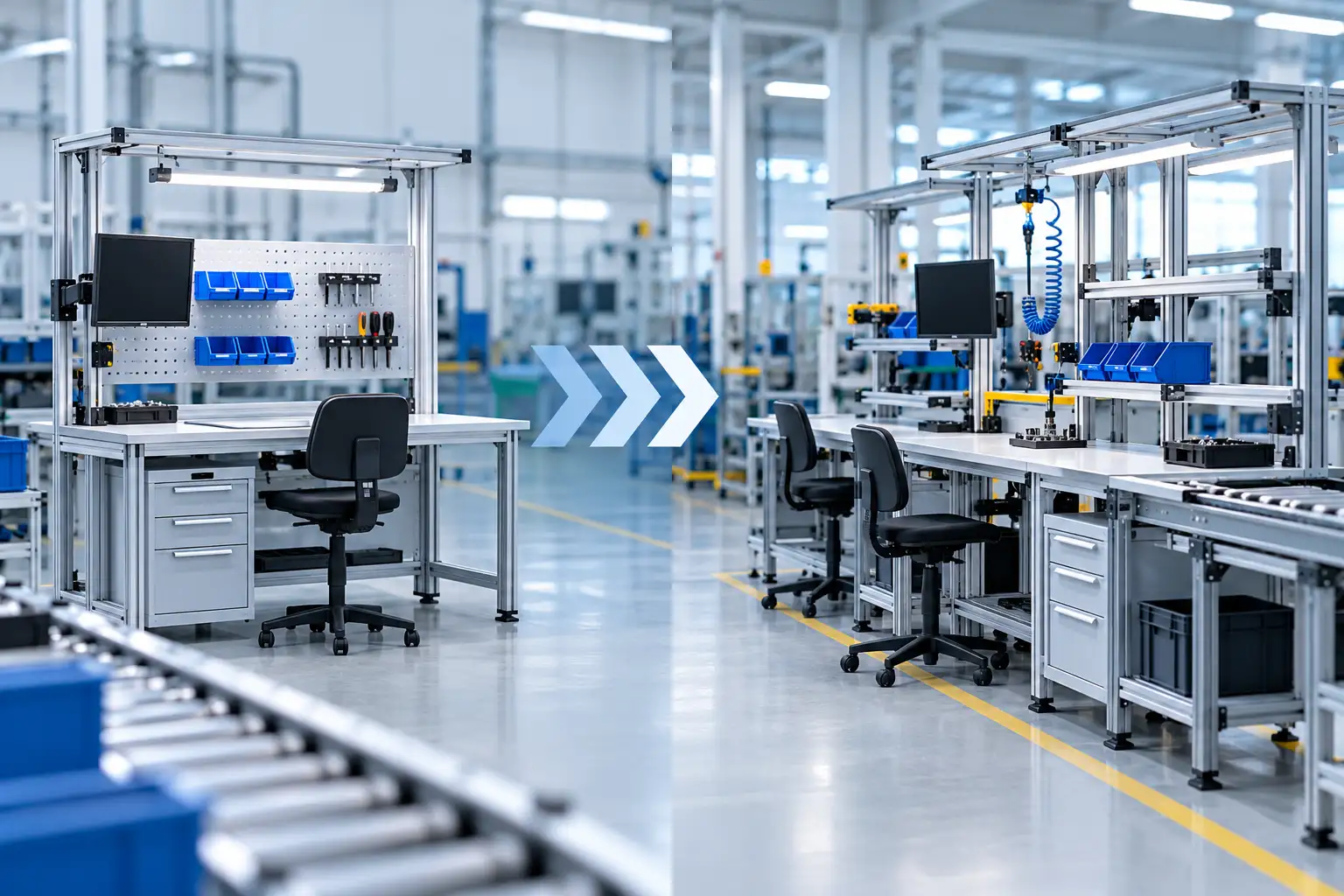
Production lines are rarely static. New products are introduced, processes are refined, equipment changes, and teams continuously look for ways to improve efficiency and organization. A workstation layout that works well today may need to support very different requirements in the future.
When those changes happen, the workspace can either help the transition or make it more complicated. Modular workstations give manufacturers greater flexibility to adjust their production areas without having to replace complete workstation systems every time requirements change.
Production Requirements Continue to Evolve
There are many reasons a production line may need to be reconfigured. A company may introduce a new product, increase production volume, add testing equipment, change an assembly process, or reorganize a line to improve workflow. Even smaller operational improvements can create new requirements for storage, equipment placement, power access, or available work surface.
Fixed workstations can make these changes more difficult because they were often designed around one particular process or layout. If equipment changes or an operator needs additional storage, the existing workstation may no longer fit the application effectively. Modular workstations provide more flexibility by allowing the workspace to change along with the production process.
Reconfigure Workstations Instead of Replacing Them
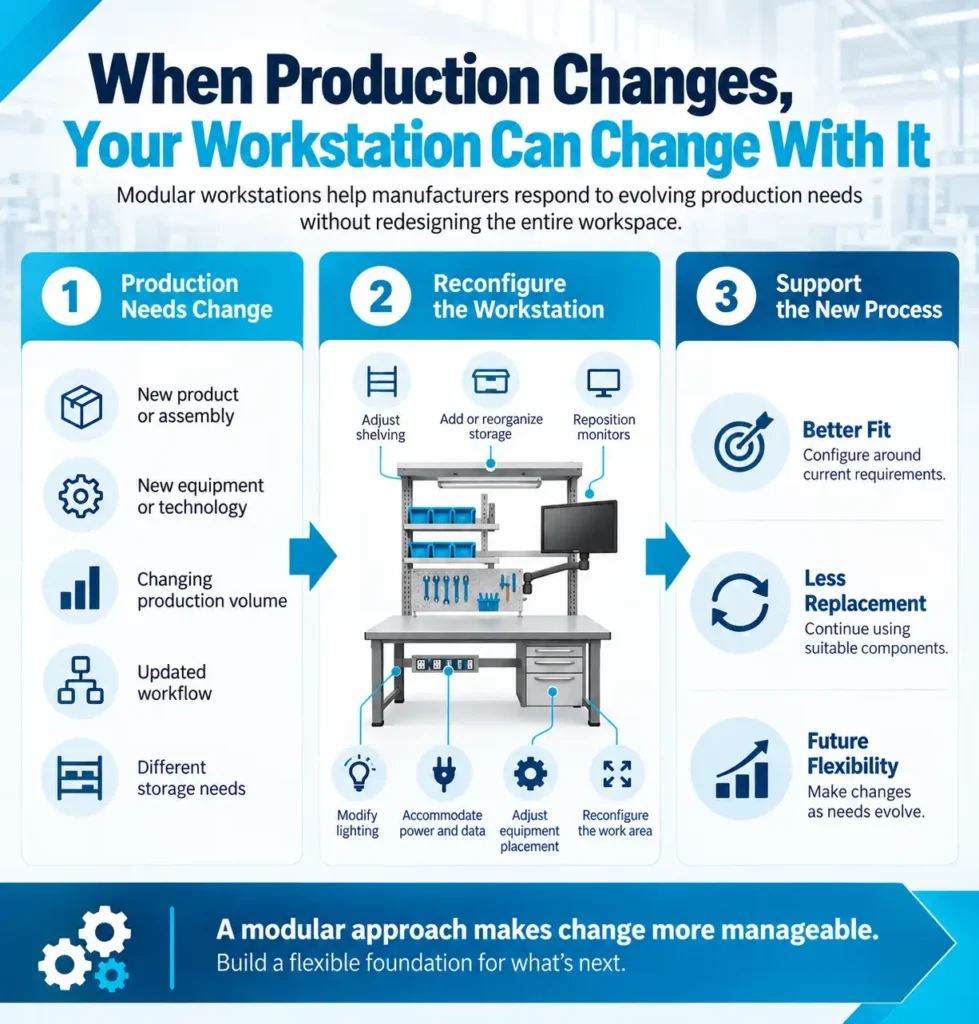
One of the primary advantages of a modular workstation is the ability to modify individual components while continuing to use the overall workstation. Depending on the system and application, shelving, storage, work surfaces, drawers, monitor mounts, lighting, power access, and other accessories can be configured around changing requirements.
This approach can make production updates more manageable. For example, an assembly workstation that initially requires a large open work surface may later need additional shelving, equipment mounting, or component storage as the process becomes more complex. Rather than replacing the entire workstation, the existing configuration can be adapted to better support the updated process.
Make Production Layout Changes More Manageable
Sometimes a production change affects more than an individual workstation. Manufacturers may need to add operators, rearrange work cells, establish a new inspection area, or change the sequence of production steps to improve material flow.
Modular workstation systems can make these larger layout changes easier to plan. Individual stations can be configured around the new workflow instead of forcing a new process into an existing arrangement that no longer works well. This flexibility can be especially useful for manufacturers that produce multiple products, frequently introduce new configurations, or expect their production requirements to evolve over time.
Accommodate New Equipment and Technology
Production equipment changes as new tools and technologies are introduced. Monitors, testing devices, scanners, fixtures, computers, and other equipment can gradually change what operators need within their immediate work area.
A workstation designed around only one equipment configuration can become restrictive when those requirements change. A modular system provides more options for integrating new equipment through adjustable shelving, mounting solutions, storage, power access, and other configurable components. This helps the workstation continue supporting the process instead of requiring the process to work around an outdated workspace.
Reduce Disruption During Production Changes
Updating a production line often requires coordination across several areas. Equipment may need to be relocated, procedures may change, operators may need training, and material flow may need to be reorganized. Adding a complete workstation replacement to that process can create another layer of complexity.
Modular workstations can help simplify workspace changes because manufacturers can focus on the components and configurations that actually need to be updated. Existing workstation structures may continue to serve the operation while specific elements are adjusted for the new process. Although the amount of disruption will depend on the scope of each project, designing work areas for adaptability can make future changes more straightforward.
Improve Workstations Based on Operator Feedback
Not every opportunity for improvement is obvious when a production line is first installed. Operators who use the workstation every day may discover that a shelf would be more useful at a different height, frequently used tools need to be closer, or additional storage could improve organization.
A modular workstation makes it easier to respond to this type of practical feedback. Instead of accepting an inefficient arrangement because changing it would require new furniture, manufacturers can adjust the workstation to better match how the task is actually performed. Over time, these refinements can help create a workspace that supports both the operator and the production process more effectively.
Support Different Products and Production Runs
Many manufacturing environments need to support more than one product or process. A workstation may be used for one assembly today and a different configuration during the next production run, creating different requirements for tools, components, equipment, and storage.
Modular workstations can be configured with this variability in mind. Adjustable components and accessories give manufacturers more options for organizing the same workspace around different tasks. This can be especially valuable when floor space is limited and dedicating a separate workstation to every product or process is not practical.
Plan for Future Flexibility From the Beginning
Manufacturers cannot predict every change that will affect a production line, but they can avoid creating workspaces that are difficult to modify. Considering potential changes during the initial workstation planning process can help identify where additional flexibility may be valuable.
Questions about future production volume, new equipment, additional operators, changing storage requirements, and possible layout adjustments can all help guide the workstation configuration. The goal is not to build for every possible scenario. It is to create a practical foundation that can be adjusted when new requirements emerge.
Modular Does Not Mean One-Size-Fits-All
Flexibility is most useful when the workstation is designed around the actual application. Different production environments have different requirements for work surfaces, dimensions, storage, equipment integration, ergonomics, and available floor space.
That is why modularity and customization work well together. A workstation can be configured for the current process while still providing options for future changes. Manufacturers get a workspace designed around their immediate needs without unnecessarily limiting how that workspace can be used later.
Build a Workspace That Can Change With Production
Production environments will continue to evolve as products, equipment, processes, and customer requirements change. Workstations that can adapt with those changes can help manufacturers avoid unnecessary limitations and make future production updates easier to manage.
Bench-Tek Manufacturing works closely with customers to understand their operators, equipment, workflow, available space, and production requirements. Whether the project involves an individual workstation or a larger production line, Bench-Tek can configure modular workstation solutions around the needs of the application while keeping future flexibility in mind.
If you are planning a new production line or updating an existing one, contact Bench-Tek to discuss a workstation configuration designed around your current requirements and ready to adapt as those requirements change.
Key Takeaways
- Modular workstations make it easier to adapt production lines as processes, products, and equipment change.
- Reconfigurable components can reduce the need to replace entire workstations during production updates.
- Flexible workstation layouts can accommodate new equipment, changing workflows, and different production runs.
- Modular designs allow manufacturers to respond more easily to operator feedback and evolving workspace needs.
- Planning for flexibility helps create production environments that can adapt to future requirements.